
Integrations & Ecosystem
Your systems stay in place. askporter connects your people to them.
The front end of your operation — connecting tenants, operatives, managers and clients to the systems you already have, without replacing any of them.


The integration gap
The gap isn't in your systems. It's between your systems and your people.
Most property and FM operations run on platforms that were never designed to talk to each other — or to the people who depend on them.
Integrations & Ecosystem
The integration gap is the single biggest operational drag in property and FM.
Four signals from our 2026 UK market research — the cost of systems that don't talk to each other, the teams that don't talk to them, and the buyers who want it fixed.
76%
of operations report inefficiencies caused by siloed software
73%
forced into reactive problem-solving every week
43%
of SLAs missed because teams cannot see what is happening across systems
32%
name integration as the single biggest barrier to adopting new technology
Source: askporter UK Facilities Management Market Research Report, 2026.
Where askporter sits
askporter isn't a replacement for your existing platforms. It's the front end your existing platforms were never built to be.
Whether you run an HMS, a CAFM, an ERP, or all three — your back-end platform does what it was designed to do. What it was not built for is the moment a resident reports a leak at eleven o'clock at night, the moment a contractor needs the context of their next job, or the moment a client wants a live update without picking up the phone. That is the layer askporter occupies — in front of your systems, facing your people.
Your systems stay in place. askporter is where your people go for a great experience — and where your operation runs more efficiently as a result.
People


Receives requests & queries
Processes & understands intent
Responds across any channel
systems

What flows through — and where it lives
Two things sit at the heart of every operation — and they don't always live in the same place.
Assets and tasks are the two flows every property and FM operation runs on. The honest answer to "where does the data live?" — the one most vendors avoid — is that it depends on what you have, and the right source of truth isn't the same for both.
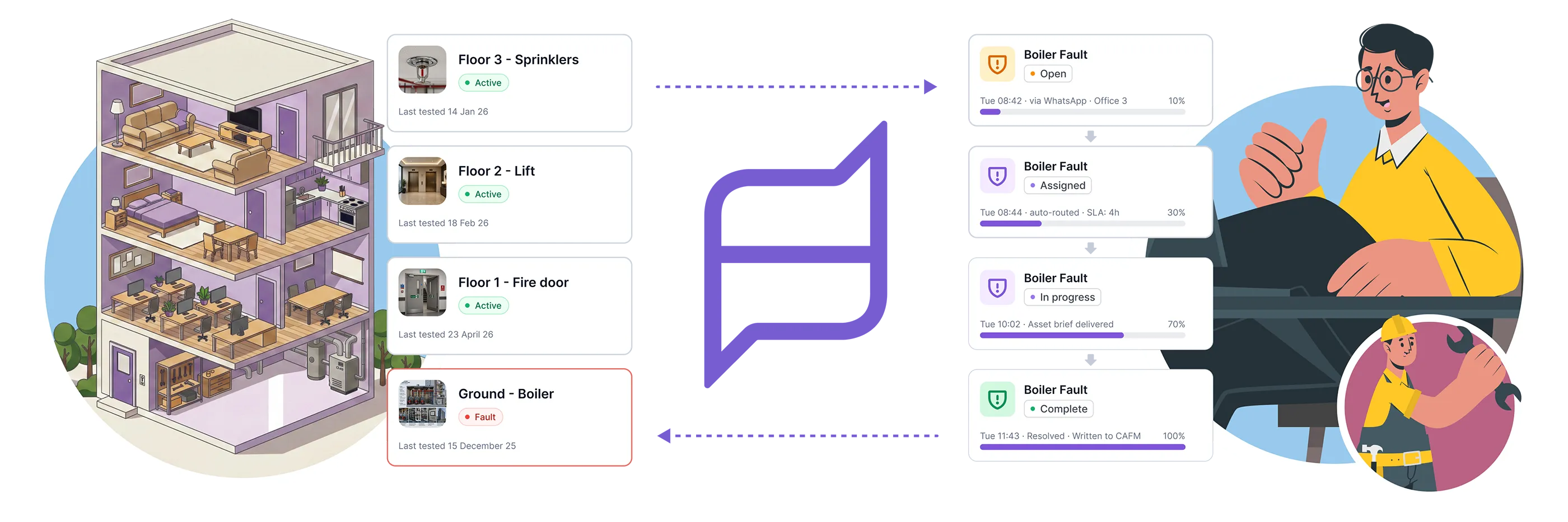

In many deployments, both systems hold relevant data — and that is fine. The goal is not to consolidate everything into one place. It is to make sure the right people can access the right information when they need it. askporter serves as that access point, whatever the underlying structure looks like.
If you have no existing systems at all, askporter acts as your system of record from day one — with integrations added as your needs evolve.
System categories
What systems does askporter connect to?
Here are the categories of systems where those assets and tasks typically live — and where askporter connects.
askporter is designed to work alongside the platforms already used in property and FM operations. The right integration depends on what you have — we configure it around your data structure and workflow, not the other way round.
Property Management Systems
Bidirectional sync with your housing or property management platform. Your PMS remains the source of truth for property, tenant and asset records. askporter adds the resident-facing and operative-facing coordination layer that your PMS was never built to be.
Asset Data Enrichment — askporter reads asset records from your PMS: maintenance history, service contracts, compliance status. When a resident reports an issue, the full asset context is available to the AI and the contractor without anyone re-keying it.
Task Creation & Routing — repair requests submitted in askporter automatically create work orders in your PMS, with full context attached (asset, history, photos, triage notes). Status updates flow back to residents in real time.
HMS / PMS
Housing
Asset Lookup
Work Order Sync

FM & Operations Platforms
askporter sits on top of your CAFM as the client-facing and operative-facing layer. Your CAFM remains the system of record for the asset register and the operational backbone. askporter brings visibility, capture and coordination to the people who need it.
Asset Inventory Sync — your CAFM holds the authoritative asset register. askporter reads asset locations, maintenance schedules and compliance requirements. When a client reports an issue against an asset, the full context is available instantly — with no duplication of the asset record.
Task Capture & Routing — clients, internal teams or tenants raise tasks through askporter. Tasks are captured with the right detail at the point of report (site, asset, priority), routed to the relevant contractor or operative, and synced into your CAFM. Updates, notes and photos flow bidirectionally so the CAFM view and the askporter view stay aligned.
Compliance & Service Records — every action taken in askporter creates an audit trail. Service completions, photos, sign-offs and notes sync to your CAFM compliance records — one trail, two views.
HMS / PMS
Housing
Asset Lookup
Work Order Sync

Work Orders, Quotes & Documentation
Where a formal work order, quote or supporting document needs to exist, askporter handles the full lifecycle — from the point a task is approved through to the invoice that closes it out — and keeps the right systems in sync throughout.
Work Order Lifecycle — tasks that require a work order trigger one automatically in your CAFM or PMS, with asset context, priority, and trade category pre-populated. Status, photos and completion notes flow back as the job progresses.askporter reads asset records from your PMS: maintenance history, service contracts, compliance status. When a resident reports an issue, the full asset context is available to the AI and the contractor without anyone re-keying it.
Quotes & Approvals — quotes can be requested from suppliers before work is carried out. Where your business rules allow (for example, below a defined value threshold), approval can be automated. Above the threshold, the quote is routed to the right approver with the context attached.
Related Documentation — risk assessments, method statements, certificates, access notes and other job-related documents are captured against the task and the work order — so the operative, the manager and the auditor all see the same record.
Work Orders
Quotes
Approvals
Documentation

Scheduling & Workforce
Appointment confirmations, contractor availability and job updates flow through askporter to tenants, operatives and managers. Works with the scheduling and workforce tools your team already uses.
Appointment Sync — slots and availability from your scheduling system flow into askporter. Tenants and clients receive confirmations and can reschedule without calling your team.
Contractor & Operative Scheduling — contractor availability and appointment slots sync from your scheduling platform. Operatives accept, progress and close jobs in askporter — updates sync back to your system automatically.
Operative Job View — operatives see their assigned jobs, confirm visits, and log completions directly in askporter. No separate app, no portal, no login friction.
DRS
Workforce Management
Appointment Sync
Operative Access

Finance & ERP
Automate the flow of quotes, purchase orders and invoices between askporter and your finance system. Reduces manual handling and can accelerate payment cycles on both sides of the relationship.
Invoice Routing & Matching — when a job is complete, the contractor or operative uploads their invoice in askporter. It is matched to the work order, routed to finance with the cost codes and asset references already in place, and pushed into your ERP for approval and payment.
Cost Code Mapping — askporter maps tasks and work orders to the cost codes in your finance system. Purchase orders and approvals continue to run through your existing processes — askporter simply feeds the data in clean, structured and on time.
ERP
Finance
Invoice Sync
Cost Codes
Property Management Systems
Bidirectional sync with your housing or property management platform. Your PMS remains the source of truth for property, tenant and asset records. askporter adds the resident-facing and operative-facing coordination layer that your PMS was never built to be.
Asset Data Enrichment — askporter reads asset records from your PMS: maintenance history, service contracts, compliance status. When a resident reports an issue, the full asset context is available to the AI and the contractor without anyone re-keying it.
Task Creation & Routing — repair requests submitted in askporter automatically create work orders in your PMS, with full context attached (asset, history, photos, triage notes). Status updates flow back to residents in real time.
HMS / PMS
Housing
Asset Lookup
Work Order Sync

FM & Operations Platforms
askporter sits on top of your CAFM as the client-facing and operative-facing layer. Your CAFM remains the system of record for the asset register and the operational backbone. askporter brings visibility, capture and coordination to the people who need it.
Asset Inventory Sync — your CAFM holds the authoritative asset register. askporter reads asset locations, maintenance schedules and compliance requirements. When a client reports an issue against an asset, the full context is available instantly — with no duplication of the asset record.
Task Capture & Routing — clients, internal teams or tenants raise tasks through askporter. Tasks are captured with the right detail at the point of report (site, asset, priority), routed to the relevant contractor or operative, and synced into your CAFM. Updates, notes and photos flow bidirectionally so the CAFM view and the askporter view stay aligned.
Compliance & Service Records — every action taken in askporter creates an audit trail. Service completions, photos, sign-offs and notes sync to your CAFM compliance records — one trail, two views.
HMS / PMS
Housing
Asset Lookup
Work Order Sync

Work Orders, Quotes & Documentation
Where a formal work order, quote or supporting document needs to exist, askporter handles the full lifecycle — from the point a task is approved through to the invoice that closes it out — and keeps the right systems in sync throughout.
Work Order Lifecycle — tasks that require a work order trigger one automatically in your CAFM or PMS, with asset context, priority, and trade category pre-populated. Status, photos and completion notes flow back as the job progresses. askporter reads asset records from your PMS: maintenance history, service contracts, compliance status. When a resident reports an issue, the full asset context is available to the AI assistant and the contractor without anyone re-keying it.
Quotes & Approvals — quotes can be requested from suppliers before work is carried out. Where your business rules allow (for example, below a defined value threshold), approval can be automated. Above the threshold, the quote is routed to the right approver with the context attached.
Related Documentation — risk assessments, method statements, certificates, access notes and other job-related documents are captured against the task and the work order — so the operative, the manager and the auditor all see the same record.
Work Orders
Quotes
Approvals
Documentation

Scheduling & Workforce
Appointment confirmations, contractor availability and job updates flow through askporter to tenants, operatives and managers. Works with the scheduling and workforce tools your team already uses.
Appointment Sync — slots and availability from your scheduling system flow into askporter. Tenants and clients receive confirmations and can reschedule without calling your team.
Contractor & Operative Scheduling — contractor availability and appointment slots sync from your scheduling platform. Operatives accept, progress and close jobs in askporter — updates sync back to your system automatically.
Operative Job View — operatives see their assigned jobs, confirm visits, and log completions directly in askporter. No separate app, no portal, no login friction.
DRS
Workforce Management
Appointment Sync
Operative Access

Finance & ERP
Automate the flow of quotes, purchase orders and invoices between askporter and your finance system. Reduces manual handling and can accelerate payment cycles on both sides of the relationship.
Invoice Routing & Matching — when a job is complete, the contractor or operative uploads their invoice in askporter. It is matched to the work order, routed to finance with the cost codes and asset references already in place, and pushed into your ERP for approval and payment.
Cost Code Mapping — askporter maps tasks and work orders to the cost codes in your finance system. Purchase orders and approvals continue to run through your existing processes — askporter simply feeds the data in clean, structured and on time.
ERP
Finance
Invoice Sync
Cost Codes

User stories
What this looks like in practice.
The setup varies depending on your operation — but here are three examples of how askporter works across different teams and stakeholders.
Under the bonnet
Built for integration from the ground up.
askporter ships with a fully documented API as standard. Any external system with an API can connect to askporter and create, read, update or manage tasks and assets programmatically.
For outbound data — sending information from askporter into your other systems — we use our integration service, configured to match your data structure and requirements.
Your data belongs to you. It can be exported at any time, in a format that works for your systems.
OpenAPI included
Fully documented OpenAPI included as standard
Incremental integrations
Integrations built incrementally — no big-bang cutover required
Configurable data flows
Inbound and outbound data flows, configurable per system
Your data, your terms
Full data portability, always.
Any level of granularity
Works at any level of asset granularity — from property-level to individual asset
Secure & compliant
Hosted in the UK and EU · GDPR compliant · EU AI Act compliant.

How a task moves through the platform
From the moment something breaks to the moment the client signs off.
No integration needed
Standalone
One-way inbound
AI triage & routing
Bidirectional sync
Assigned
Workforce connected
Scheduling & Operative Tools
Full stack connected
Finance & Invoice Sync

Integration with existing FM applications
askporter ensures simple & user friendly interaction between end users & existing FM applications. In addition, askporter can handle the interaction between engineers & end users thus reducing the volume of requests that are sent to the helpdesk team.
See where askporter fits in your ecosystem.
You do not need your integration story figured out before you start. Talk to us about your current setup — your HMS, your CAFM, your ERP, your workforce tool, or the spreadsheets you are still trying to retire — and we will show you exactly where askporter fits, and how quickly you can go live.






Tech Innovation Awards 2026
Best FM & Housing AI Platform

Property Week Resi 2025
PropTech Innovation

Housing Innovation 2025
Best Repairs & Maintenance

Cyber Essentials Plus accredited
UK government-backed · externally audited

UK & EU hosted
UK data residency by default

GDPR compliant
Documented data processing · DPA on request

EU AI Act compliant
AI governance framework · 2024 legislation
Tech Innovation Awards 2026
Best FM & Housing AI Platform
Property Week Resi 2025
PropTech Innovation
Housing Innovation 2025
Best Repairs & Maintenance
Cyber Essentials Plus accredited
UK government-backed · externally audited
UK & EU hosted
UK data residency by default
GDPR compliant
Documented data processing · DPA on request
EU AI Act compliant
AI governance framework · 2024 legislation